Create a 3 Nodes Kafka On Your Local Machine
Overview
For learning purpose, creating a kafka cluster with just one broker is usually enough. However, to simulate the real word, setting up a 3 nodes cluster is ideal.
This post shows you how to quickly setup a 3 nodes cluster on your machine with kafka 3.9
Download Kafka
You can download kafka 3.9 from there:
https://dlcdn.apache.org/kafka/3.9.0/kafka_2.13-3.9.0.tgz
If that link is unavailable, you can go here to download.
https://kafka.apache.org/downloads
Setup your local folder
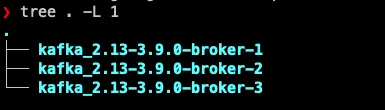
Let’s extract it and copy to three different directories
Since the version is 3.9, you don’t need to setup zookeeper but use kraft instead.
Let’s configure the broker.properties for each server
broker.properties configurations
Edit the config/kraft/broker.properties for each server as follow
First server
process.roles=broker,controller
node.id=1

listeners=PLAINTEXT://localhost:9092,CONTROLLER://localhost:9095
advertised.listeners=PLAINTEXT://localhost:9092
inter.broker.listener.name=PLAINTEXT

controller.listener.names=CONTROLLER
controller.quorum.voters=1@localhost:9095,2@localhost:9096,3@localhost:9097
listener.security.protocol.map=CONTROLLER:PLAINTEXT,PLAINTEXT:PLAINTEXT

log.dirs=/tmp/kraft-broker-logs-1

num.partitions=3
offsets.topic.replication.factor=3
transaction.state.log.replication.factor=3
transaction.state.log.min.isr=2
Second server
process.roles=broker,controller
node.id=2

listeners=PLAINTEXT://localhost:9093,CONTROLLER://localhost:9096
advertised.listeners=PLAINTEXT://localhost:9093
inter.broker.listener.name=PLAINTEXT

controller.listener.names=CONTROLLER
controller.quorum.voters=1@localhost:9095,2@localhost:9096,3@localhost:9097
listener.security.protocol.map=CONTROLLER:PLAINTEXT,PLAINTEXT:PLAINTEXT

log.dirs=/tmp/kraft-broker-logs-2

num.partitions=3
offsets.topic.replication.factor=3
transaction.state.log.replication.factor=3
transaction.state.log.min.isr=2
Server 3
process.roles=broker,controller
node.id=3

listeners=PLAINTEXT://localhost:9094,CONTROLLER://localhost:9097
advertised.listeners=PLAINTEXT://localhost:9094
inter.broker.listener.name=PLAINTEXT

controller.listener.names=CONTROLLER
controller.quorum.voters=1@localhost:9095,2@localhost:9096,3@localhost:9097
listener.security.protocol.map=CONTROLLER:PLAINTEXT,PLAINTEXT:PLAINTEXT

log.dirs=/tmp/kraft-broker-logs-3

num.partitions=3
offsets.topic.replication.factor=3
transaction.state.log.replication.factor=3
transaction.state.log.min.isr=2
As you can see, the differences are the node id, log dirs
Start the servers
From any server, run this:
./kafka_2.13-3.9.0-broker-1/bin/kafka-storage.sh random-uuidIt will generate a random string. Use that to run the following every server
./bin/kafka-storage.sh format -t fAkvlYXOSf-EUdHEv4C5og -c ./config/kraft/broker.propertiesNow you can start each server.
You can cd to each server and start the broker node with this command:
./bin/kafka-server-start.sh ./config/kraft/broker.propertiesAfter all nodes start, you can create your first topic:
bin/kafka-topics.sh \                                                                                                                                  ─╯ │
  --bootstrap-server localhost:9092 \                                                                                                                         │
  --create \                                                                                                                                                  │
  --topic my-topic \                                                                                                                                          │
  --partitions 3 \                                                                                                                                            │
  --replication-factor 3
Now if you run the describe topic command:
bin/kafka-topics.sh --bootstrap-server localhost:9092 --describe --topic my-topicThen you can see that the topic has 3 partitions with replicas on three brokers:
